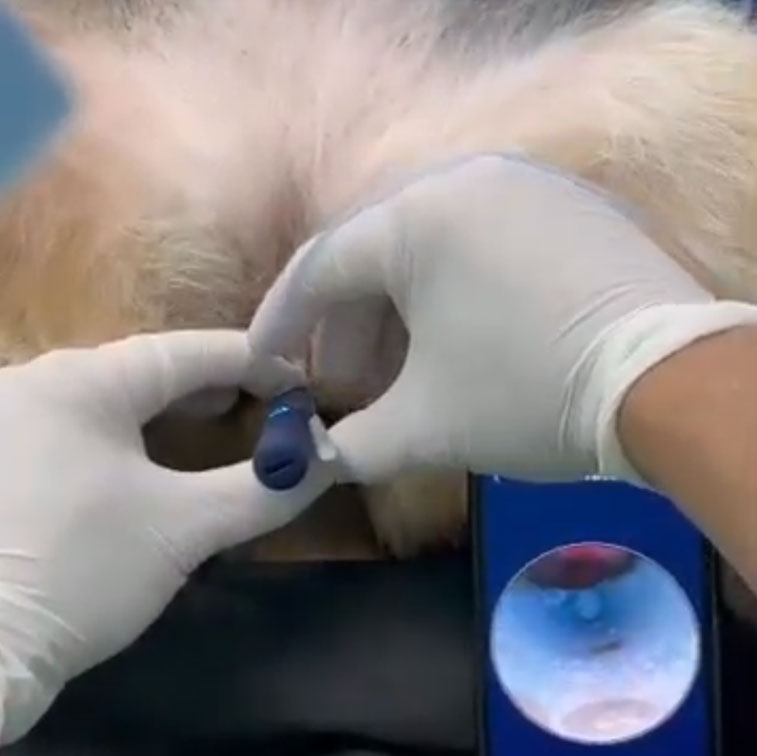
Micro-Videoscopy and Urethral Catheterization System
D-ureth is an innovative solution for performing otoscopy, rostral rhinoscopy, pharyngo-laryngoscopy, and video-assisted urethral catheterization.
What is D-Ureth?
D-Ureth is an innovative video-assisted urethral catheterization solution for female dogs and cats, built on advanced videoscopy technology.
Its optimized design includes specially developed 3D-printed inserts, enabling effortless access to the vaginal vestibule and precise identification of the urethral meatus. The catheter is inserted alongside a stylet, while live video feed is streamed via Wi-Fi to a dedicated smartphone or tablet app—offering versatility and adaptability for routine clinical use.
Key Specs
Image Sensor
10 MP CMOS
Video Resolution
1080p (Full HD)
Lens Diameter
3.2 mm
Focal Length
12.5 mm
Wi-Fi Frequency
2.4 GHz
Frame Rate
20 fps
Gyroscope
6-axis Gimbaled Intelligent Gyroscope
Lighting
6 integrated LED lights
Ingress Protection
IP67 (water- and dust-resistant)
Body Materia
ABS + PC with UV coating
Battery
230 mAh lithium
Autonomy
~80 min
Charge time
~60 min
Charging port
USB-C charging
App Compatibility
iOS and Android
3D-Printed Inserts
Fabricados mediante impresión 3D
Made from medical-grade TPU for flexibility and safety. Available in three sizes:
Size L
Medium to large breed females
Size M
Small to medium breed females
Size S
Young puppies and adult female cats
Usage Instructions
Install the D-Ureth app on your device.
Power on the videoscope; wait for the blue light.
Connect your device to the “Bebird” Wi-Fi network.
Open the app to start streaming.
Choose and attach the correct insert; lubricate if needed.
Begin catheter insertion, optimizing visualization.
Use the app to record images and video.
Clean the lens carefully after use.
Charging & Troubleshooting:
– Charge via included USB-C cable; red LED indicates charging.
– If unresponsive: ensure full charge, reboot device.